- Python 53.3%
- Vue 36.1%
- JavaScript 9.7%
- Makefile 0.9%
|
|
||
|---|---|---|
| .github/workflows | ||
| static | ||
| tests | ||
| .gitignore | ||
| .prettierrc | ||
| __init__.py | ||
| config.json | ||
| crud.py | ||
| description.md | ||
| helpers.py | ||
| LICENSE | ||
| Makefile | ||
| manifest.json | ||
| migrations.py | ||
| models.py | ||
| package-lock.json | ||
| package.json | ||
| pyproject.toml | ||
| README.md | ||
| tasks.py | ||
| toc.md | ||
| uv.lock | ||
| views.py | ||
| views_api.py | ||
| views_lnurl.py | ||

LNURLp - LNbits extension
For more about LNBits extension check this tutorial
Create a static QR code or LNaddress people can use to pay over Lightning Network
LNURL is a range of lightning-network standards that allow us to use lightning-network differently. An LNURL-pay is a link that wallets use to fetch an invoice from a server on-demand. The link or QR code is fixed, but each time it is read by a compatible wallet a new invoice is issued by the service and sent to the wallet.
Usage
-
Create an LNURLp (New Pay link)

- select your wallets
- make a small description
- enter amount
- if Fixed amount is unchecked you'll have the option to configure a Max and Min amount
- you can set the currency to something different than sats. For example if you choose EUR, the satoshi amount will be calculated when a user scans the LNURLp
- You can ask the user to send a comment that will be sent along with the payment (for example a comment to a blog post)
- Webhook URL allows to call an URL when the LNURLp is paid
- Success mesage, will send a message back to the user after a successful payment, for example a thank you note
- Success URL, will send back a clickable link to the user. Access to some hidden content, or a download link
-
Use the shareable link or view the LNURLp you just created

- you can now open your LNURLp and copy the LNURL, get the shareable link or print it

- you can now open your LNURLp and copy the LNURL, get the shareable link or print it
-
Optional - add Lightning Address
- attach a username to your lnurlp to create a lightning address
- the LN address format will be username@lnbits-domain-name
- Find out more about the lightning address spec at lightningaddress.com
Update your LNURL-pay extension
Now that the extensions are taken out of core LNbits we can update each extension separately without the need to reload or restart LNbits as a whole. This new version of the extension will give you the option to add a Lightning Address to each LNURLpay link.
- Open your LNbits instance as super admin (not as a regular user. You will find the SuperUser-ID in your server logs on restart of LNbits. Use that to bookmark and manage LNbits from there in the future.) Now lets install the new version of a given extension like extensively described in this guide. In short:
- Go to "Manage extensions", click on "ALL", search for e.g. LNURLp, click on "Manage"
- Open the details of the extension and click on version 0.2.1, click "Install". You´re done!
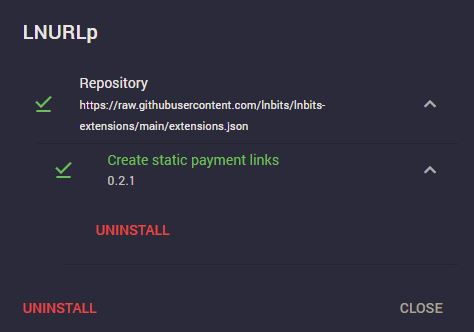
- Open the LNURLp extension from the left panel
- If you already have had some LNURLp defined, you can now click on edit and add a LN Address to each. Note that this will change your QR-Code!
- If you didn't create any LNURLp before nothing changed except the window for defining new ones
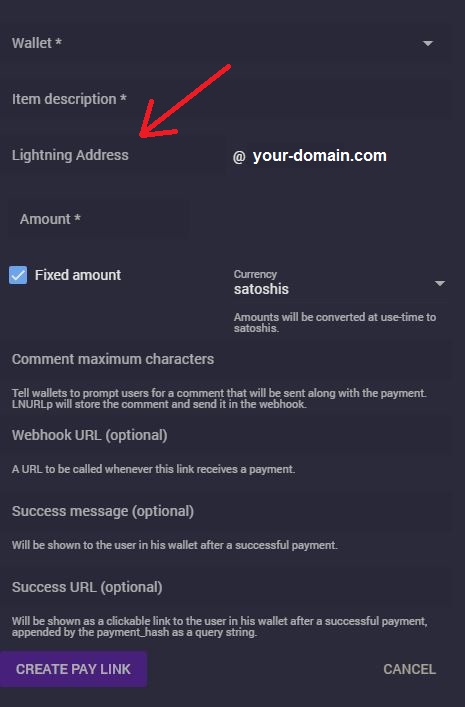
Now you can receive sats to your newly created LN address. You will find this info also in the transaction overview for each payment (click on the green arrow).