 33b06bcd9b
* feat: use 1.4.0 dynamic extension loading and go through extension todo: https://github.com/lnbits/lnbits/issues/3652
57 lines
3.6 KiB
Markdown
57 lines
3.6 KiB
Markdown
# LNURLp - <small>[LNbits](https://github.com/lnbits/lnbits) extension</small>
|
||
|
||
<small>For more about LNBits extension check [this tutorial](https://github.com/lnbits/lnbits/wiki/LNbits-Extensions)</small>
|
||
|
||
## Create a static QR code or LNaddress people can use to pay over Lightning Network
|
||
|
||
LNURL is a range of lightning-network standards that allow us to use lightning-network differently. An LNURL-pay is a link that wallets use to fetch an invoice from a server on-demand. The link or QR code is fixed, but each time it is read by a compatible wallet a new invoice is issued by the service and sent to the wallet.
|
||
|
||
[**Wallets supporting LNURL**](https://github.com/fiatjaf/awesome-lnurl#wallets)
|
||
|
||
## Usage
|
||
|
||
1. Create an LNURLp (New Pay link)\
|
||

|
||
- select your wallets
|
||
- make a small description
|
||
- enter amount
|
||
- if _Fixed amount_ is unchecked you'll have the option to configure a Max and Min amount
|
||
- you can set the currency to something different than sats. For example if you choose EUR, the satoshi amount will be calculated when a user scans the LNURLp
|
||
- You can ask the user to send a comment that will be sent along with the payment (for example a comment to a blog post)
|
||
- Webhook URL allows to call an URL when the LNURLp is paid
|
||
- Success mesage, will send a message back to the user after a successful payment, for example a thank you note
|
||
- Success URL, will send back a clickable link to the user. Access to some hidden content, or a download link
|
||
|
||
2. Use the shareable link or view the LNURLp you just created\
|
||

|
||
- you can now open your LNURLp and copy the LNURL, get the shareable link or print it\
|
||

|
||
|
||
3. Optional - add Lightning Address
|
||
- attach a username to your lnurlp to create a lightning address
|
||
- the LN address format will be username@lnbits-domain-name
|
||
- Find out more about the lightning address spec at lightningaddress.com
|
||
|
||
## Update your LNURL-pay extension
|
||
|
||
Now that the extensions are taken out of core LNbits we can update each extension separately without the need to reload or restart LNbits as a whole.
|
||
This new version of the extension will give you the option to add a Lightning Address to each LNURLpay link.
|
||
|
||
- Open your LNbits instance as super admin (not as a regular user. You will find the SuperUser-ID in your server logs on restart of LNbits. Use that to bookmark and manage LNbits from there in the future.)
|
||
Now lets install the new version of a given extension like extensively [described in this guide](https://github.com/lnbits/lnbits/blob/main/docs/guide/extension-install.md#install-new-extension). In short:
|
||
- Go to "Manage extensions", click on "ALL", search for e.g. LNURLp, click on "Manage"
|
||
- Open the details of the extension and click on version 0.2.1, click "Install". You´re done!
|
||
|
||
[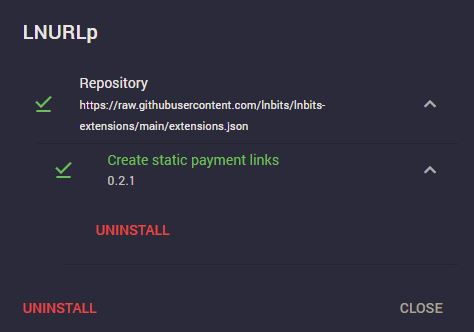](https://postimg.cc/xqFWtDfq)
|
||
|
||
- Open the LNURLp extension from the left panel
|
||
- If you already have had some LNURLp defined, you can now click on edit and add a LN Address to each. _Note that this will change your QR-Code!_
|
||
- If you didn't create any LNURLp before nothing changed except the window for defining new ones
|
||
|
||
[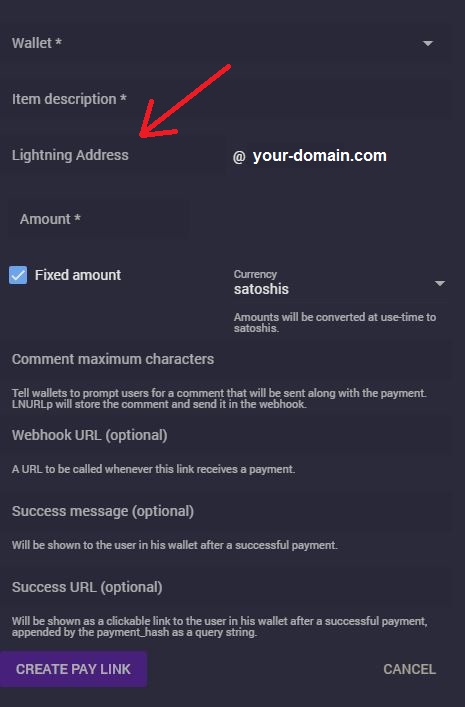](https://postimg.cc/tnnhNVkq)
|
||
|
||
Now you can receive sats to your newly created LN address. You will find this info also in the transaction overview for each payment (click on the green arrow).
|
||
|
||
[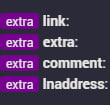](https://postimg.cc/3WwsXJHP)
|
||
|
||
</details>
|